4. (Bonus) Shared elements + Circular Reveal
Circular Reveal is just an animation to show or hide a group of UI elements. It is available since API 21 in
ViewAnimationUtilsclass.
Circular Reveal animation can be used in combination of Shared Element Transition to create meaningful animations that smoothly teach the user what is happening in the app.
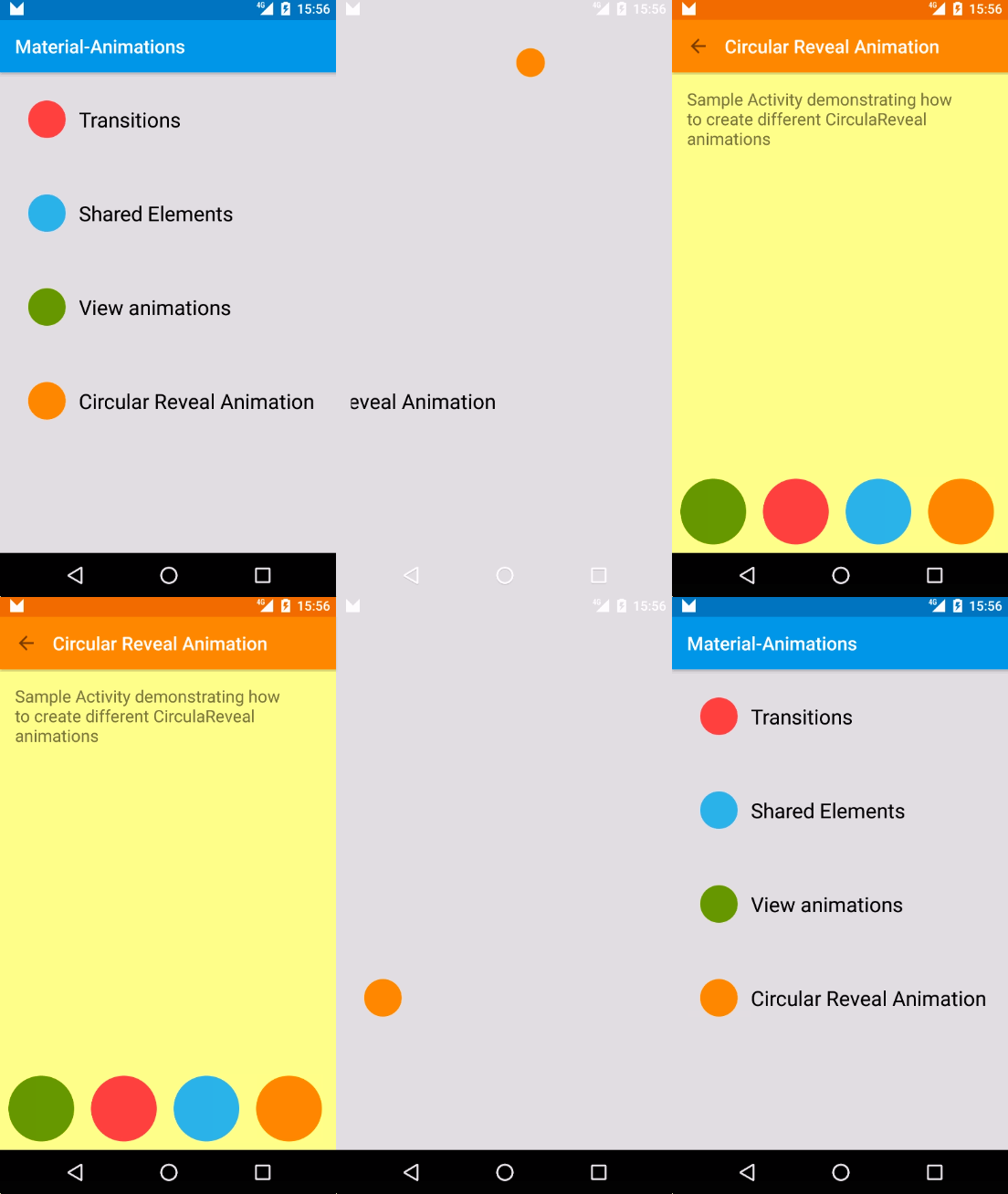
What is happening in this example step by step is:
- Orange circle is a shared element transitioning from
MainActivitytoRevealActivity. - On
RevealActivitythere is a listener to listen for shared element transition end. When that happens it does two things:- Execute a Circular Reveal animation for the Toolbar
- Execute a scale up animation on
RevealActivityviews using plain oldViewPropertyAnimator
Listen to shared element enter transition end
Transition transition = TransitionInflater.from(this).inflateTransition(R.transition.changebounds_with_arcmotion);
getWindow().setSharedElementEnterTransition(transition);
transition.addListener(new Transition.TransitionListener() {
    @Override
    public void onTransitionEnd(Transition transition) {
        animateRevealShow(toolbar);
        animateButtonsIn();
    }

    (...)

});
Reveal Toolbar
private void animateRevealShow(View viewRoot) {
    int cx = (viewRoot.getLeft() + viewRoot.getRight()) / 2;
    int cy = (viewRoot.getTop() + viewRoot.getBottom()) / 2;
    int finalRadius = Math.max(viewRoot.getWidth(), viewRoot.getHeight());

    Animator anim = ViewAnimationUtils.createCircularReveal(viewRoot, cx, cy, 0, finalRadius);
    viewRoot.setVisibility(View.VISIBLE);
    anim.setDuration(1000);
    anim.setInterpolator(new AccelerateInterpolator());
    anim.start();
}
Scale up activity layout views
private void animateButtonsIn() {
    for (int i = 0; i < bgViewGroup.getChildCount(); i++) {
        View child = bgViewGroup.getChildAt(i);
        child.animate()
                .setStartDelay(100 + i * DELAY)
                .setInterpolator(interpolator)
                .alpha(1)
                .scaleX(1)
                .scaleY(1);
    }
}
More circular reveal animations
There are many different ways you can create a reveal animation. The important thing is to use the animation to help the user understand what is happening in the app.
Circular Reveal from the middle of target view
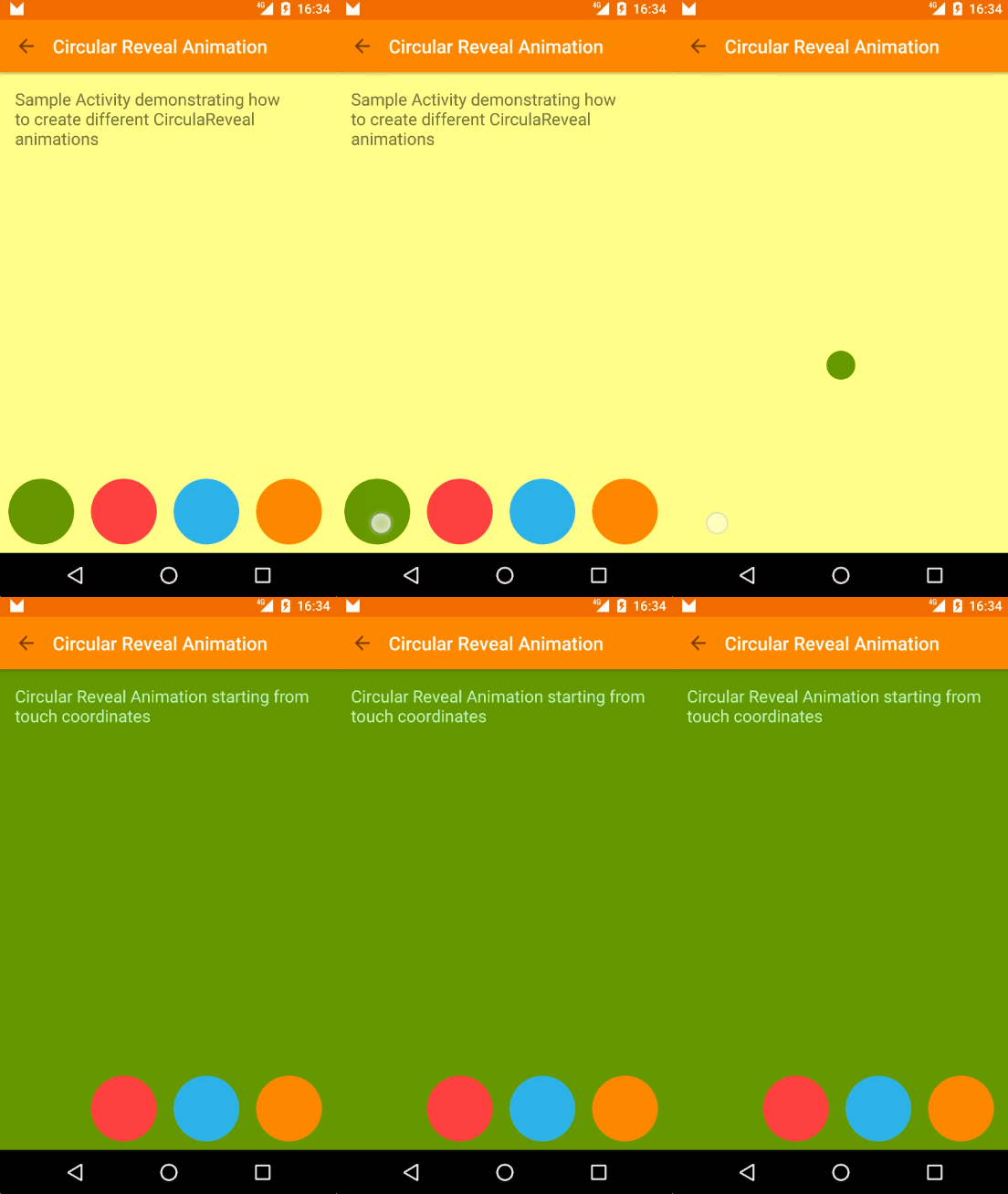
int cx = (viewRoot.getLeft() + viewRoot.getRight()) / 2;
int cy = viewRoot.getTop();
int finalRadius = Math.max(viewRoot.getWidth(), viewRoot.getHeight());

Animator anim = ViewAnimationUtils.createCircularReveal(viewRoot, cx, cy, 0, finalRadius);
viewRoot.setBackgroundColor(color);
anim.start();
Circular Reveal from top of target view + animations
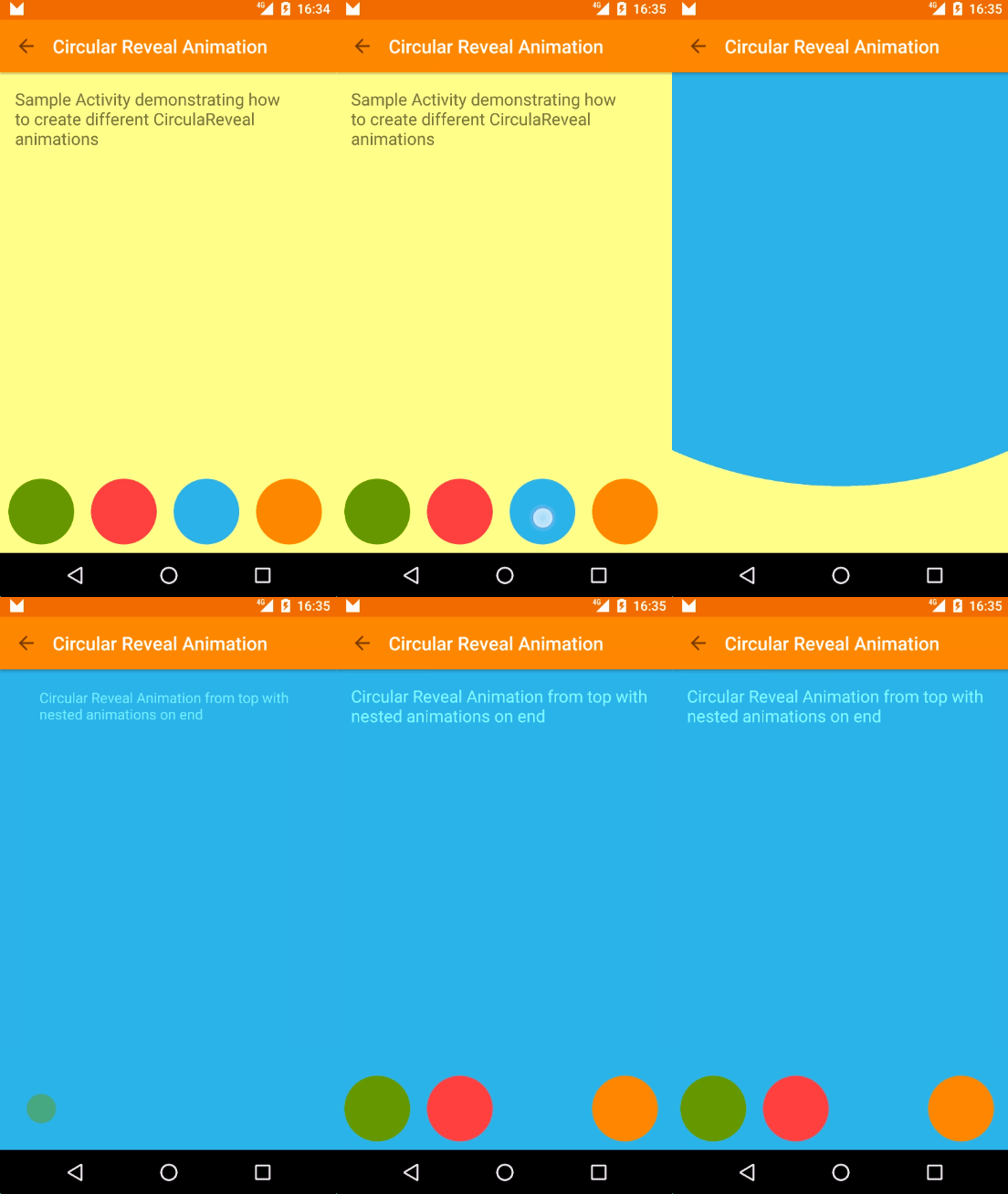
int cx = (viewRoot.getLeft() + viewRoot.getRight()) / 2;
int cy = (viewRoot.getTop() + viewRoot.getBottom()) / 2;
int finalRadius = Math.max(viewRoot.getWidth(), viewRoot.getHeight());

Animator anim = ViewAnimationUtils.createCircularReveal(viewRoot, cx, cy, 0, finalRadius);
viewRoot.setBackgroundColor(color);
anim.addListener(new AnimatorListenerAdapter() {
    @Override
    public void onAnimationEnd(Animator animation) {
        animateButtonsIn();
    }
});
anim.start();
Circular Reveal from touch point
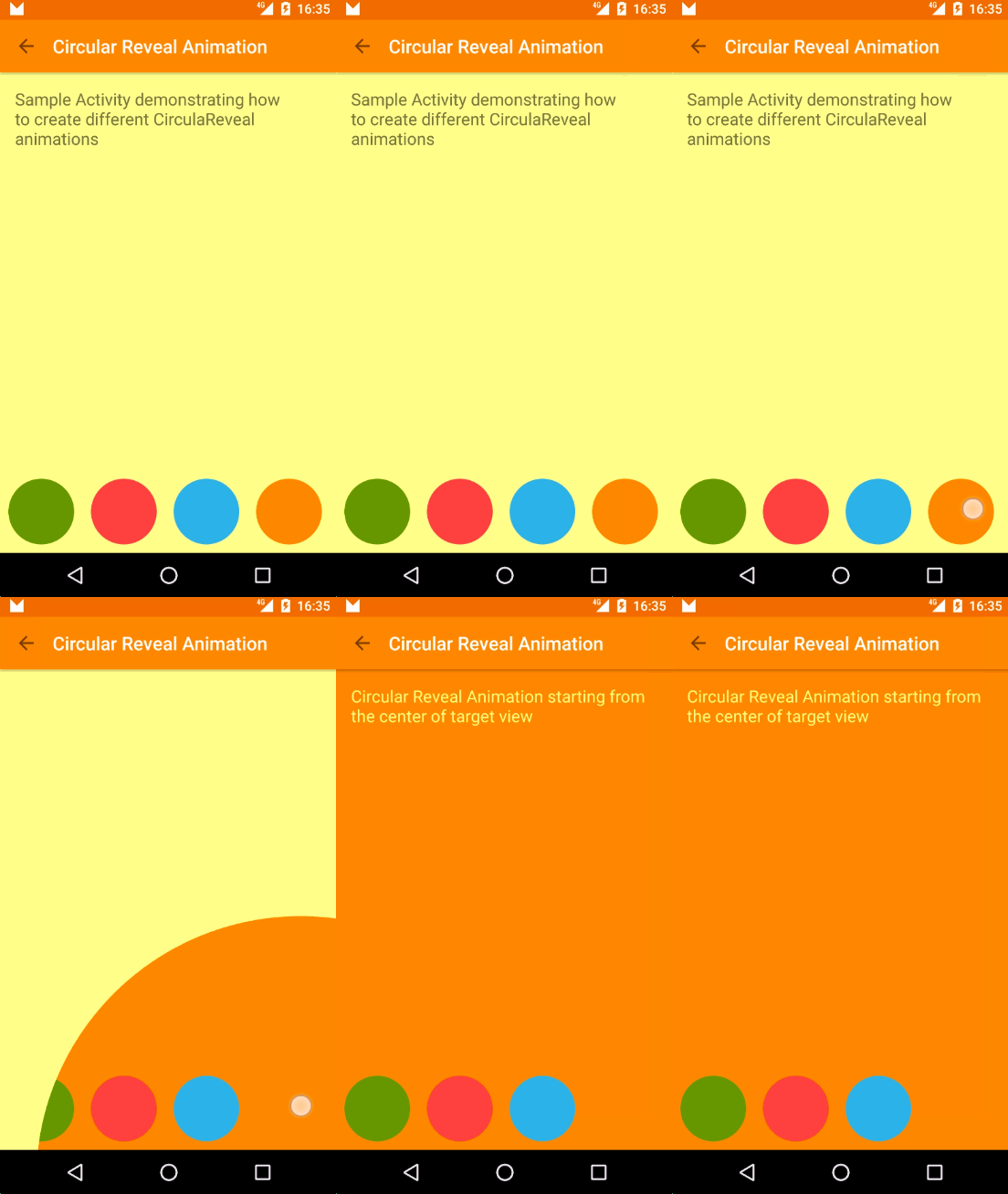
@Override
public boolean onTouch(View view, MotionEvent motionEvent) {
    if (motionEvent.getAction() == MotionEvent.ACTION_DOWN) {
        if (view.getId() == R.id.square_yellow) {
            revealFromCoordinates(motionEvent.getRawX(), motionEvent.getRawY());
        }
    }
    return false;
}
private Animator animateRevealColorFromCoordinates(int x, int y) {
    float finalRadius = (float) Math.hypot(viewRoot.getWidth(), viewRoot.getHeight());

    Animator anim = ViewAnimationUtils.createCircularReveal(viewRoot, x, y, 0, finalRadius);
    viewRoot.setBackgroundColor(color);
    anim.start();
}
Animate and Reveal
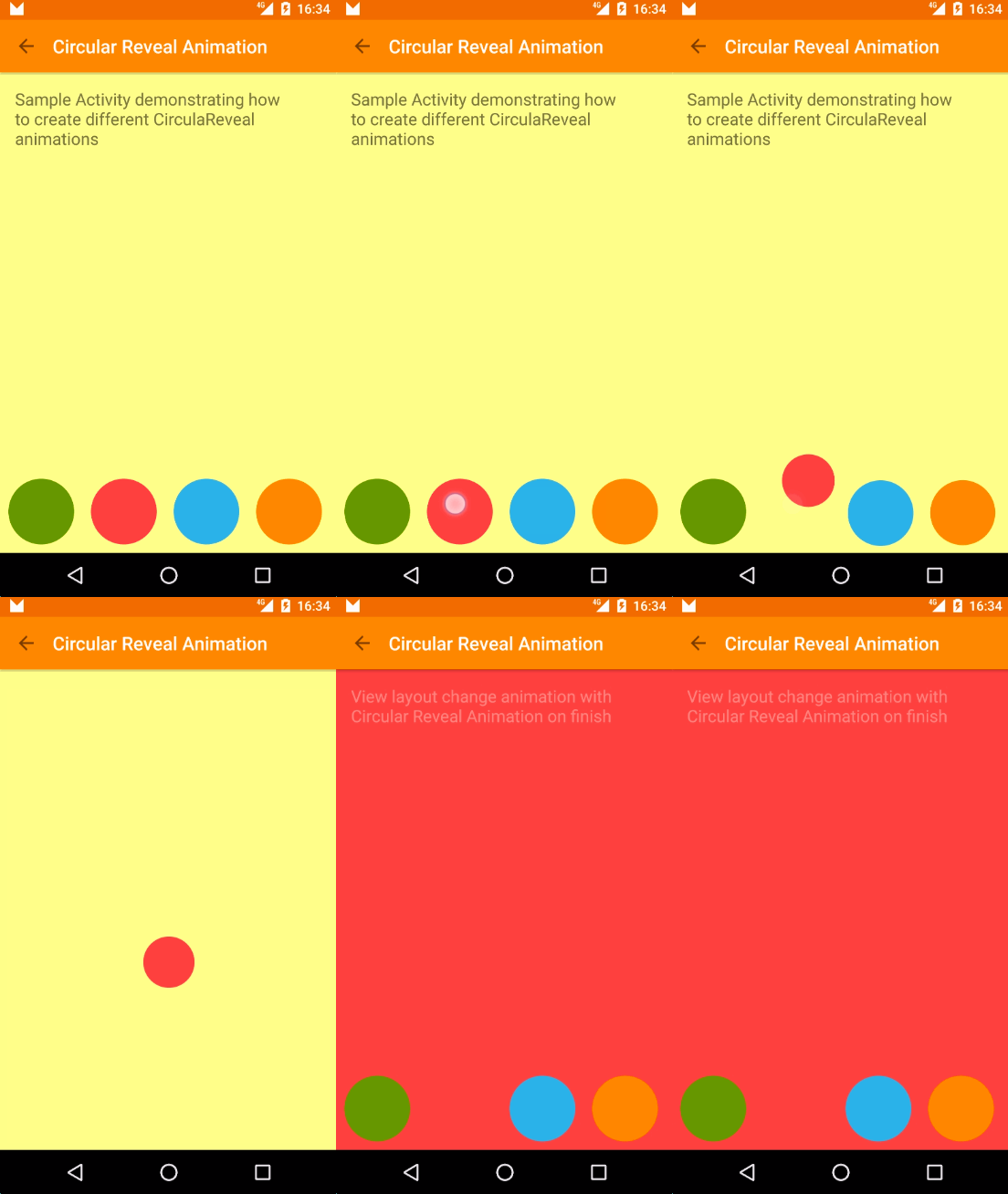
Transition transition = TransitionInflater.from(this).inflateTransition(R.transition.changebounds_with_arcmotion);
transition.addListener(new Transition.TransitionListener() {
    @Override
    public void onTransitionEnd(Transition transition) {
        animateRevealColor(bgViewGroup, R.color.red);
    }
    (...)

});
TransitionManager.beginDelayedTransition(bgViewGroup, transition);
RelativeLayout.LayoutParams layoutParams = new RelativeLayout.LayoutParams(RelativeLayout.LayoutParams.WRAP_CONTENT, RelativeLayout.LayoutParams.WRAP_CONTENT);
layoutParams.addRule(RelativeLayout.CENTER_IN_PARENT);
btnRed.setLayoutParams(layoutParams);
Sample source code
More information
- Alex Lockwood posts about Transition Framework. A great in deep into this topic: http://www.androiddesignpatterns.com/2014/12/activity-fragment-transitions-in-android-lollipop-part1.html
- Amazing repository with lot of Material Design samples by Saul Molinero: https://github.com/saulmm/Android-Material-Examples
- Chet Hasse video explaining Transition framework: https://www.youtube.com/watch?v=S3H7nJ4QaD8
Comments
Post a Comment